Error adding users to Microsoft Dynamics CRM 4.0.

Today I came across an issue with CRM 4.0 where one of our dedicated installations with its own Active Directory could not add users into CRM.Naturally, the error displayed inside CRM was a generic error message with no specific information of any helpful nature. 

The error from the Trace Logs was as follows :  

[2009-01-15 11:37:47.8] Process: w3wp |Organization:373c636e-eaf2-404d-bf10-979cb92e39d3 |Thread:    8 |Category: Platform |User: 2d9d9775-7b3b-4a62-bde2-aaee539c8aa5 |Level: Error | MessageProcessor.Execute
>MessageProcessor fail to process message 'Create' for 'systemuser'.
[2009-01-15 11:37:47.8] Process: w3wp |Organization:373c636e-eaf2-404d-bf10-979cb92e39d3 |Thread:    8 |Category: Exception |User: 2d9d9775-7b3b-4a62-bde2-aaee539c8aa5 |Level: Error | CrmException..ctor
 at CrmException..ctor(String message, Exception innerException, Int32 errorCode)
 at SoapExtensionExceptionHandlerBase.GetCrmException(Exception exception)
 at InProcessCrmService.Execute(Object request)
 at PlatformCommand.ExecuteInternal()
 at CreateCommand.Execute()
 at SystemUser.Create(Boolean performDuplicateCheck)
 at EntityProxy.CreateAndRetrieve(String columnSet, Boolean performDuplicateCheck)
 at AppForm.RaiseDataEvent(FormEventId eventId)
 at EndUserForm.Initialize(Entity entity)
 at CustomizableForm.Execute(Entity entity, String formType)
 at SystemUserDetailPage.ConfigureForm()
 at AppUIPage.OnPreRender(EventArgs e)
 at Control.PreRenderRecursiveInternal()
 at Page.ProcessRequestMain(Boolean includeStagesBeforeAsyncPoint, Boolean includeStagesAfterAsyncPoint)
 at Page.ProcessRequest(Boolean includeStagesBeforeAsyncPoint, Boolean includeStagesAfterAsyncPoint)
 at Page.ProcessRequest()
 at Page.ProcessRequest(HttpContext context)
 at biz_users_edit_aspx.ProcessRequest(HttpContext context)
 at CallHandlerExecutionStep.System.Web.HttpApplication.IExecutionStep.Execute()
 at HttpApplication.ExecuteStep(IExecutionStep step, Boolean& completedSynchronously)
 at ApplicationStepManager.ResumeSteps(Exception error)
 at HttpApplication.System.Web.IHttpAsyncHandler.BeginProcessRequest(HttpContext context, AsyncCallback cb, Object extraData)
 at HttpRuntime.ProcessRequestInternal(HttpWorkerRequest wr)
 at HttpRuntime.ProcessRequestNoDemand(HttpWorkerRequest wr)
 at ISAPIRuntime.ProcessRequest(IntPtr ecb, Int32 iWRType)

And

>MSCRM Error Report:
——————————————————————————————————–
Error: Exception has been thrown by the target of an invocation.
Error Message: Exception has been thrown by the target of an invocation.
Source File: Not available
Line Number: Not available
Request URL: http://www.crminstallation.com/biz/users/edit.aspx?_CreateFromType=10&_CreateFromId={9CEDFF4E-82CA-DD11-82C1-00215E3F818C}
Stack Trace Info: [UnauthorizedAccessException: Access is denied. (Exception from HRESULT: 0x80070005 (E_ACCESSDENIED))]
[TargetInvocationException: Exception has been thrown by the target of an invocation.]
   at System.DirectoryServices.DirectoryEntry.Invoke(String methodName, Object[] args)
   at Microsoft.Crm.BusinessEntities.SecurityUtils.AddPrincipalToGroup(Guid principalId, Guid groupId)
   at Microsoft.Crm.BusinessEntities.SecurityLibrary.AddPrincipalToGroup(Guid principalId, Guid groupId)
   at Microsoft.Crm.ObjectModel.SystemUserServiceInternal`1.ManageGroupsHelper(Guid activeDirectoryGuid, Boolean remove, ExecutionContext context)
   at Microsoft.Crm.ObjectModel.SystemUserServiceInternal`1.AddPrincipalToGroups(Guid activeDirectoryGuid, ExecutionContext context)
   at Microsoft.Crm.ObjectModel.SystemUserServiceInternal`1.CreateInternal(Guid organizationId, IBusinessEntity systemuser, ExecutionContext context)
   at Microsoft.Crm.ObjectModel.SystemUserServiceInternal`1.Create(IBusinessEntity systemuser, ExecutionContext context)

[TargetInvocationException: Exception has been thrown by the target of an invocation.]
   at System.RuntimeMethodHandle._InvokeMethodFast(Object target, Object[] arguments, SignatureStruct& sig, MethodAttributes methodAttributes, RuntimeTypeHandle typeOwner)
   at System.RuntimeMethodHandle.InvokeMethodFast(Object target, Object[] arguments, Signature sig, MethodAttributes methodAttributes, RuntimeTypeHandle typeOwner)
   at System.Reflection.RuntimeMethodInfo.Invoke(Object obj, BindingFlags invokeAttr, Binder binder, Object[] parameters, CultureInfo culture, Boolean skipVisibilityChecks)
   at System.Reflection.RuntimeMethodInfo.Invoke(Object obj, BindingFlags invokeAttr, Binder binder, Object[] parameters, CultureInfo culture)
   at System.Web.Services.Protocols.LogicalMethodInfo.Invoke(Object target, Object[] values)
   at Microsoft.Crm.Extensibility.InternalOperationPlugin.Execute(IPluginExecutionContext context)
   at Microsoft.Crm.Extensibility.PluginStep.Execute(PipelineExecutionContext context)
   at Microsoft.Crm.Extensibility.Pipeline.Execute(PipelineExecutionContext context)
   at Microsoft.Crm.Extensibility.MessageProcessor.Execute(PipelineExecutionContext context)
   at Microsoft.Crm.Extensibility.InternalMessageDispatcher.Execute(PipelineExecutionContext context)
   at Microsoft.Crm.Extensibility.ExternalMessageDispatcher.Execute(String messageName, Int32 primaryObjectTypeCode, Int32 secondaryObjectTypeCode, PropertyBag fields, CorrelationToken correlationToken, CallerOriginToken originToken, UserAuth userAuth, Guid callerId)
   at Microsoft.Crm.Sdk.RequestBase.Process(Int32 primaryObjectTypeCode, Int32 secondaryObjectTypeCode, CorrelationToken correlationToken, CallerOriginToken originToken, UserAuth userAuth, Guid callerId)
   at Microsoft.Crm.Sdk.RequestBase.Process(CorrelationToken correlationToken, CallerOriginToken originToken, UserAuth userAuth, Guid callerId)
   at Microsoft.Crm.Sdk.CrmServiceInternal.Execute(RequestBase request, CorrelationToken correlationToken, CallerOriginToken originToken, UserAuth userAuth, Guid callerId)
   at Microsoft.Crm.Sdk.InProcessCrmService.Execute(Object request)
   at Microsoft.Crm.Application.Platform.ServiceCommands.PlatformCommand.ExecuteInternal()
   at Microsoft.Crm.Application.Platform.ServiceCommands.CreateCommand.Execute()
   at Microsoft.Crm.Application.Platform.SystemUser.Create(Boolean performDuplicateCheck)
   at Microsoft.Crm.Application.Platform.EntityProxy.CreateAndRetrieve(String columnSet, Boolean performDuplicateCheck)
   at Microsoft.Crm.Application.Forms.AppForm.RaiseDataEvent(FormEventId eventId)

Fortunately I had seen this one before, and fixing it is pretty easy.  Just switch the registry entry HKLMMicrosoftMSCRMAutoGroupManagement from 0 to 1.  
What lengths will I go to for a free t-shirt?

A friend of mine just sent me this :

Do you have a blog? Well the blog about your favourite Windows 7 Feature including a Screenshot and a photo of your PC running Windows 7 to be in the running for a T-shirt. Email your blog post to itproanz@microsoft.com. The 20 most creative blog posts will get the Shirts.

Terms and Conditions are here.

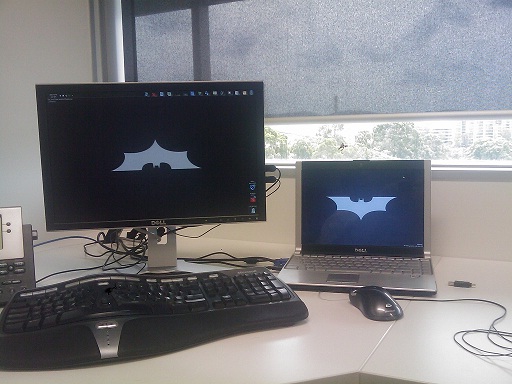
I happened to mention this to my good friend Batman (Sorry, I can't give out his identity, not even for a free t-shirt.) who has been using Windows 7 since the release of the beta.  Here is a photo of Batman's desktop, natually we had to move the computer out of the bat cave for security reasons.


Batman's Desktop


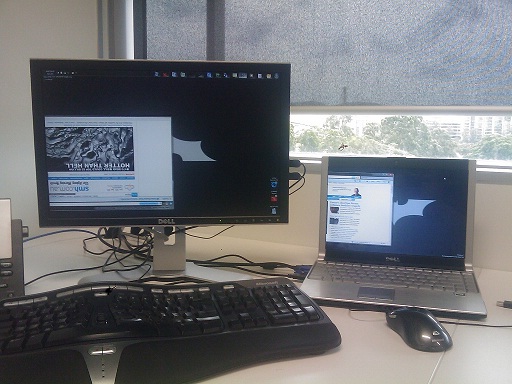
Batman suggested his favourite feature to me, which was the ability to flip the orientation of your display.  Wow, thats pretty cool for an out of the box feature Batman, nice find, but what possible use could that be?


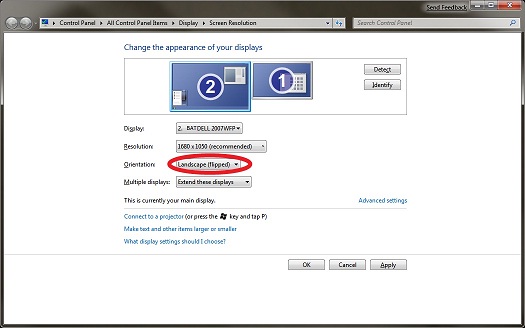
Batman responded that as he likes to hang upside down when using his computer that a display in the normal orientation was difficult to use and the last thing a crime fighter needs is a headache when fighting crime.  The settings to flip your display can be found in the Screen Resolution section of the display control panel.


Batman's Settings


Of course having the screen flipped presents a problem for anyone else using Batman's computer, lets not forget Alfred who also might use the computer from time to time.  Never fear, because you can isolate the flipping of your screen to one specific monitor, meaning that if Batman drags a window over to the laptop screen on the right, it will appear in the normal orientation.


Batman reading the news.

Finally an operating system that caters to super heroes who hang upside down while browsing the net.  Batman reckons he can't wait until the full release of Windows 7 and is really hanging out for it, bad pun intended.

Having trouble joining Windows 7 to a domain?

If you are having trouble joining Windows 7 to a domain, and receive a odd error message with "Parameter is incorrect" then you are not alone. This issue seems to occur if you have more than 16 characters in the first portion of the domain you are attempting to join.

Microsoft has released a hotfix which addresses this issue on all architectures and you can grab it from : http://support.microsoft.com/hotfix/KBHotfix.aspx?kbnum=961402&kbln=en-us

On an odd note, the name of the hotfix seems a little bit odd : Windows6.1-KB961402-x86.msu.  It seems odd to name one of the first Windows 7 hotfixes with Windows 6.1.

No Virtual Machines in SCVMM 2008 Self Service Portal – What the?

After installing System Center Virtual Machine Manager 2008 (SCVMM 2008) into our production environment we decided to try fully utilize the feature of the product to offer our clients a web based portal to login and manage their virtual machines.  This all seemed fine in practice until we actually installed the SCVMM 2008 Self Service Portal and found that not a single Virtual Machine is visible, and no error messages or helpful information is displayed.

We had initially assumed this was a problem with the User Roles which I had assumed to be the primary mechanism for distributing permissions to individual users and groups.  Well I was half right, User Roles controls access to the portal itself, as well as the hosts and library shares that that user role will have access to. To actually view a Virtual Machine within the portal you need to be an Owner, or a member of a group that has Ownership of the Virtual Machine.

I'm still undecided if I like this feature or not, I like the granularity it offers – i.e. I can allow a client to view their two virtual guests on our host, without compromising the security of the other guests on the server.  On the other hand, I don't like having to double handle my permissions in two different areas.  I think time will tell on this one, and functionality will win out over inconvenience as it usually does.

To change the ownership of a Virtual Machine using SCVMM 2008 Administrator's Console is fairly simple as it can be edited in the properties menu.  For more than one server I would recommend using PowerShell.  The command to change the ownership of a Virtual Machine follows :

Set-VM -vm "VMName" -owner "DomainNewOwner"

For anyone who wants to do any SCVMM 2008 Self-Service Portal PowerShell Scripting this is a great resource, http://technet.microsoft.com/en-us/library/bb963722.aspx, it includes a bunch of useful sample scripts. 

And an additional quick warning, I have found that running PowerShell scripts to change properties of large groups of Virtual Machines can from time to time slow down VMM, or even bring it to a complete half.  Use wisely!

Happy New Year, I have Writer's Block

I don't really go in for New Year's Resolutions, but I had promised myself to blog more often in 2009.  It looks like I've already gotten to a bad start this year as it is already 11 days in and this is only my second post.  I really couldn't find anything interesting to talk about and so I've gotten into a kind of writer's block.  Each time I opened OneNote to write anything down I'd end up within a few minutes doing something idle like browsing Wikipedia, Indeed even while doing this post I've already gone off on a Wikipedia tangent.

After mentioning this on Twitter, one of the friendly guys that is following me suggested I do a post on Writers Block.  It is an interesting idea and surely in the age of personal publishing there must be a few people out there suffering from the same problem?  And surely in aforementioned age someone else has decided to blog about it? A quick visit to the search engine gods show that "yes, it has been mentioned, blogged and dissected in detail".  Here are a few that I foudn useful :

http://www.problogger.net/battling-bloggers-block/
http://www.lifeclever.com/10-tips-for-beating-bloggers-block/
http://www.bigsmoke.us/bloggers-block/
http://www.problogger.net/archives/2005/11/29/20-types-of-blog-posts-battling-bloggers-block/

What I will do is quickly detail the ways to overcome writer's block.  There are an almost endless number of suggestions out there, but here are the few more helpful that I found across various postings:

  1. Mention your block to someone else.  Being challenged instantly jogged my mind.
  2. Take a break.  Spend some time with the family, play a game, listen to music or watch a movie.  If you are reading this this there is a good chance you work too much, stop working and take a break!
  3. Exercise.  This one could be a little painful for some technical people like me, but getting oxygen into the brain surely can't be a bad thing.
  4. Write down your ideas.  I know I get a few ideas, especially late at night trying to get to sleep, but I never ever write these down.  I am going to start keeping a notepad next to the bed.  I would advise against keeping a notebook next to the bed for instantly blogging your ideas, they can make a little less sense in the light of day.
  5. Case Studies and Interviews.  These can be an easy way to get content out quickly that will interest other people, especially outside of your regular readers.
  6. HitTail.  This is my favourite as it is a technical solution to a non-technical problem.  HitTail analyses your blog content and may give you an indication on what other topics you could cover. 
  7. Write something, write anything.  Automatic Writing, Free Writing and Mind Writing are all well documented.  This may get you out of your block, but you could also end up writing about something you have no desire publishing.   As a technical writer, this particular step could be less useful.

I also took a different tack on this, one of my colleagues mentioned to me that just because a concept was elementary to me did not mean it was not worth blogging about or documenting.  After giving this some thought I realised it could spawn a whole series of topics for me to cover including some of the following:

  • Configuring Site Collections, Web Applications and SSPs.  This stuff has been covered before by many people, but this does not mean it is not worth covering again, and perhaps with some of my own practices that we have found to work best in our environment.  Note how I cunningly avoided putting the words best and practices next to each other.
  • Configuring Excel Services, Search, Profile Importing within an SSP.  I've put this on its own bullet as I think that from a beginner's point of view these topics could all stand a bit more coverage.
  • Reporting on the various Licenses used in your SharePoint Installations.  This is a difficult one, and I'm still trying to work out how to automate this process.  Once I figure this out it will be a decent post.
  • Configuring CRM4 to disable the "Add Multiple Users" feature which can be considered a security flaw in a multi-tenanted Internet Facing Deployment.
  • Using ISA 2006 to secure HostHeader based Windows Sharepoint Services Sites with their own SSL certificates.

These are a few of the ideas that I have decided to cover in the coming weeks, and I would welcome any comments on those ideas. Hopefully by using a few of the tips above, and picking one of those ideas I will be punching out a new post in no time.

Why are my SharePoint Audit Logs missing the MachineName and MachineIP data?

Audit Log Reporting seems to be one of those topics within SharePoint that is still a little misunderstood.  I have blogged on it before here, and suggest that if you are not familiar with Audit Logs that you view that post quickly before reading on.  There is also an overview which can be read here on the office.microsoft.com site.

I received a question about Audit Log Reporting from one of the readers of my blog a few months ago, and since then it hasn't been the first time I've heard it :

I read your blog about SharePoint Audit Log Report. I'm trying to get a report but I cannot get the "Machine Name" and "Machine IP" data. Can you help me? Is there any settings that I'm missing?

My answer was that there were no settings missing, and unfortunately the data missing is by design. 

Here is a row taken straight from the Audit table :

Site Id Item Id Item Type User Id Machine Name Machine IP Document Location Location Type Occurred (GMT) Event Custom Event Name Event Source Source Name Event Data
ed91340f-e335-45d2-82f3-c6521eb23fc0 59af845e-b604-436e-9c08-0a948a27d996 Document NT AUTHORITYlocal service _catalogs/masterpage/Editing Menu/CustomSiteAction.xml

As you can see the MachineName and MachineIP values are mysteriously null, in fact querying the table for a row where they were not null returns zero results, they are never used. Unfortunately the reason in this case is to view KB939246, which has the following as a cause : The values in the MachineIP column and in the MachineName column appear as NULL because of privacy concerns. By design, Windows SharePoint Services 3.0 works in this manner.

This feature is not going to be reporting MachineName or MachineIP of actions in the audit log any time soon, it is a bit of a shame because I can imagine some occasions where this could be useful.  Keep in mind that your IIS logs will still contain all the IP information, and if you have a timestamp you should have no problem tracing that request back to a particular IP.  Unless you have your site set to be edited by anonymous users, the UserID field is going to be far more valuable when utilizing these reports, however you may need to perform a join to the userinfo before you will get anything particularly relevant out of it, i.e.

SELECT     UserInfo.tp_Login AS UserLogin, UserInfo.tp_Title AS UserTitle, AuditData.SiteId, AuditData.ItemId, AuditData.ItemType, AuditData.DocLocation,
                      AuditData.Occurred, AuditData.Event, AuditData.EventName, AuditData.EventSource, AuditData.SourceName, AuditData.EventData
FROM         AuditData
INNER JOIN UserInfo ON AuditData.UserId = UserInfo.tp_ID

I would not be surprised if the functionality to turn back on the MachineIP and MachineName reporting could be enabled by flicking a switch in the registry or database, but as yet I have had no luck finding it.  Maybe someone else out there will, good luck!

5 reasons why I have fallen in love with SCVMM 2008

A few months ago System Centre Virtual Machine Manager 2008 (SCVMM) was fully released, I know I actually took a long while to give this a try, mostly due to a fairly miserable experience I had with it in beta.  However after taking a bit of time to install and get to know this it, I am really thrilled to say that this product is fantastic and it really delivers.

Less than 48 hours after testing and installation I was trying to bring the guys I work with around to my viewpoint on why we need this product in our organisation immediately.  If you have multiple virtual servers within your organisation, you cannot afford not to have this!

Here are my 5 reasons I have fallen in love with it, and I think you would too.

1.  Migrations

Three kinds of migration are now available in SCVMM.  Virtual To Virtual (V2V), Physical to Virtual (P2V), Host To Host (H2H?  Maybe I just invented a new term)

V2V – Virtual to Virtual Migration.  This feature is amazing, it allows you to do an on the fly conversion / migration of virtual servers to a new host.  I recently converted a set of VMDK files from an ESX Virtual Machine to new Hyper-V machine with no problem at all.  You can store the VMDK files in the SCVMM Library (See #5) and do an offline conversion, or if you have SCVMM managing an ESX server (See #4) you can do an online migration.  It will even install all the necessary drivers for you to get your VM up and running with a minimum of fuss.

P2V – Physical to Virtual Migration.  This is something that has been around in ESX for a while now, but it is very nice to have this feature running in SCVMM.  Either offline or online P2V can be performed; I have heard some rumour that the offline version may be more reliable, I have not yet substantiated this for myself.

H2H – Host To Host migration.  This is simply called "Migration" within SCVMM, in ESX it was called "VMotion".  This is an offline migration of a server from one host to another, during this process the server will be turned off and turned back on when migration to the new host server is complete.

2.  Web Console

This feature is going to be big news for Hosting companies.  It is a web based console you can log into to manage your Virtual Machines, Hosts, Anything!  Pretty much if you can do it in the SCVMM Administrators Console, you can do it in the Web Console.  Finally a tool to allow your end users, customers or even developers the ability to remotely manage their own servers.

This sounds like it could potentially be a security concern, but the SCVMM team has built in a fairly robust permissions system that will allow you to delegate appropriate permissions fairly granularly to your users.  A specific user may only be able to see the status of their own VM Guest, while another user may see an entire group of servers they can reboot at will.

3.  Operations Manager and PowerShell Integration

Combine SCVMM 2008 with System Center Operations Manager and suddenly amid a few new Management Packs you have the ability to monitor the health of your hosts and guests.  For any service provider being able to actually monitor the health of the VMs at a host level will be very useful.  There may be other features and benefits here too, but as yet I have not had a chance to fiddle too much with it. 

With every 2008 or later product, Microsoft has been including PowerShell providers, and SCVMM is no exception.  Anything you can do in the Administrators console you can do in PowerShell.  At a quick guess the administrators console merely generates PowerShell scripts and executes them in the background, and a plus side of this is that most of the wizards can export a PowerShell command so they can be re-run if needed.

4.  Management, Maintenance and Resources

If I have not mentioned it already, if you have ESX infrastructure as well as Microsoft virtualisation technologies, SCVMM can also manage all of your Hosts and VMs in one place.  Of course this is not just limited to Hyper-V and ESX, if you have Virtual Server 2005 SCVMM can also manage this.

For monitoring your resources the Administrators console allows you to quickly view on a pie chart the status of your hosts, guests and jobs. This console also allows you to select a host machine and quickly find out how many VMs are on there, and more importantly how many resources are available on the host.   This is something Hyper-V and Virtual Server do not have readily available. 

The SCVMM Administrator and Web console also give you an indication of how much CPU and Memory each of your guests are using, this is not a particularly new feature as it was available in the Virtual Server 2005 Web interface, but having it in the same place as all the other tools is fairly useful.

5.  The Library

Think of the library as a catalogue of Virtual Disks, Virtual Servers, ISO's and Configurations that you may want to deploy more than once.  By right clicking an object in the library you can bring up a deployment wizard. For example, deploying a new Guest would be as easy as right clicking on an image stored in the library and filling in a few blanks in the wizard, or you could potentially convert an ESX guest that was stored in the library to Hyper-V, and so on.Of course for the library to be much use, you need a fast and easy way to import new content. 

A currently running VM can be imported quite easily, the import process will copy the VM into the library as a template, and also perform a sysprep on the operating system VHD files, this way new VMs can be deployed extremely quickly.  VMM also allows the ability to run post-configuration scripts so that if you have any build scripts that would ordinarily be run after a server had been installed, this can do it for you with no interaction.

I have not gone terribly in depth with any of these features, but I hope I have given a few people out there an idea of what SCVMM can do for them.  If you have any lingering doubts, I recommend grabbing a trial copy and running it up on a VM.  It is probably not a supported configuration, but that?s what I did and it worked relatively well for me.

180 day trial downloads of SCVMM are available and more information can be found at http://www.microsoft.com/systemcenter/virtualmachinemanager/en/us/default.aspx

December Cumulative Updates for SharePoint re-released.

If you have tried to install the recently released December Cumulative Update for SharePoint you may have noticed that the original release actually fails during the post-installation configuration.  Jeremy Thake came across the same issue at and has more detail on it here http://wss.made4the.net/archive/2008/12/20/sharepoint-december-cumulative-update-error-and-resolution.aspx . I had difficulty installing this myself, but was able to get around the errors that occur by taking similar steps to Jeremy.  

 Fortunately the SharePoint Team noticed this fairly quickly and have released an updated version of December Cumulative Updates that no longer causes this issue.The revised version can be downloaded from the updated links on the original SharePoint team blog post : http://blogs.msdn.com/sharepoint/archive/2008/12/17/announcing-december-cumulative-update-for-office-sharepoint-server-2007-and-windows-sharepoint-services-3-0.aspx, and now there is a small comment on the page reflecting the investigation and update to the installer. 

A comment from myself on this particular update, finally it is actually cumulative!  This update can be applied from SharePoint SP1 upwards, however, as always, just because hotfixes are released does not mean they need to be installed!  Gauge the need to install them carefully against the problems they resolve.  For most installations SP1 + Infrastructure Updates will be more than sufficient, with the exception of any security updates that have or may be released in the future, i.e.  MS08-077.

Revisited – Content Deployment error? How to find those checked out items within Sharepoint

A month or so ago I put up a post about how to find checked out items within a Sharepoint site.  This particular error tends to bring up problems with Content Deployment, as CD cannot occur if there are any items checked out.

Unfortunately there is no inbuilt method to find these items for an Administrator, the only way within the standard Sharepoint interface if that on the Site Actions menu, each user can check if there are any items still checked out and quickly check them back in.  Training users to do this can be problematic however, and sometimes it is just easier to point them at the items that are still checked out.

I had a query to do this, but one of the readers has suggested a much better query than my own for finding these items :

SELECT AllUserData.tp_DirName, 'http://SiteName/' + AllUserData.tp_DirName, AllUserData.tp_LeafName,
case when AllUserData.tp_ContentType = 'Item'
then 'http://SiteName/' + AllUserData.tp_DirName + '/DispForm.aspx?ID=' + AllUserData.tp_LeafName
else 'http://SiteName/' + AllUserData.tp_DirName + '/' + AllUserData.tp_LeafName
end as Link,AllUserData.tp_ContentType, AllUserData.nvarchar1, AllUserData.nvarchar2, AllUserData.tp_ModerationStatus, AllUserData.tp_DeleteTransactionId, AllUserData.tp_IsCurrent
FROM AllUserData AllUserData
WHERE (AllUserData.tp_ModerationStatus=2)
AND (AllUserData.tp_DeleteTransactionId=0x0)
AND (AllUserData.tp_IsCurrent=1)
ORDER BY AllUserData.tp_DirName, AllUserData.tp_LeafName

Just replace the http://SiteName/ with the url to your Site, and use this on the database of your Web Application and you are good to go. Thank you very much to rwoods@city.pg.bc.ca for supplying this great query.

Grooming and Operation Manager

Sorry for the disgusting lack of posts recently, I have not really come across anything interesting to post about with Sharepoint or CRM, and I have been quite busy working with other products such as Data Protection Manager and Operations Manager.

So this update is just a quick one to point out a fantastic blog on Operations Manager by Jonathon Almquist : http://blogs.technet.com/jonathanalmquist/ 

Last night I had an issue with Ops Manager where no alerts were being generated, and attempting to resolve any of the alerts via the GUI were not working.  After a few minutes on Google I came across Jonathons site and got a few ideas on what my Ops Manager problem could be.  Using the power shell commands listed on his blog, I was able to immediately see that grooming was not working, and quite quickly I was able to get the server back to an operating state.  Thanks Jonathon!

For anyone curious the following command showed me just how many objects outside of the grooming threshold there were :

>$Threshold = (Get-Date).AddDays(-(get-defaultsetting)[42].Value).Date;Get-Alert | Where {$_.TimeResolved -and $_.TimeResolved.Date -lt $Threshold} | Measure-Object